



 Github Stars:
 Last Commit:
  Created:


Overview:
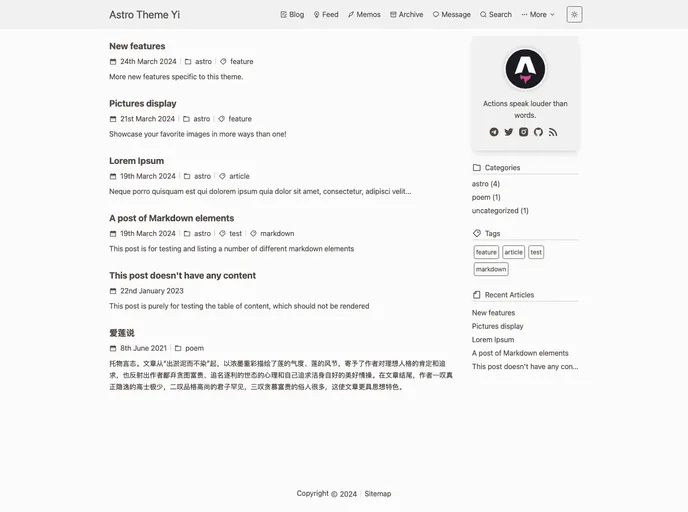
The Astro Theme Yi is a content-focused blog theme named “Yi,” which translates to fast and concise in Chinese. It includes features that support multi-platform display, dark mode, i18n, search functionality, SEO-friendliness, sitemap, RSS, article drafts, Waline Comment support, image lazy loading, and fixed permalinks for articles.
Features:
- Multi-platform Display: Supports displaying content on multiple platforms effectively.
- Dark Mode: Includes a dark mode option for improved readability in low light.
- i18n Support: Offers internationalization support for localization needs.
- Search Functionality: Enables users to search for specific content within the blog.
- SEO-friendly: Designed to be search engine optimized for better visibility.
- Sitemap and RSS Support: Generates sitemap and RSS feeds for improved site indexing and content distribution.
- Article Drafts: Allows users to save and work on drafts before publishing.
- Waline Comment Support: Integrates Waline Comment for interactive discussions.
- Image Lazy Loading and Scaling: Enhances performance by loading images dynamically as they appear.
- Fixed Permalinks for Articles: Ensures consistent and permanent links to articles for improved navigation.
Installation:
To manually install the Astro Theme Yi, follow these steps:
- Ensure Node.js version is >= 18 and pnpm version is >= 8.
- Write articles in the
src/content/blogfolder and dynamic content in thesrc/content/feedfolder. - After packaging, a
distfolder will be created in the root directory. - Upload the
distfolder to the web server directory. - Modify configurations in the
src/const.tsfile as needed for website, comment system, and other settings. - Modify the
siteproperty in theastro.config.mjsfile to generate the site map correctly.
Summary:
The Astro Theme Yi is a feature-rich blog theme designed for content-focused websites. With support for multiple key features such as dark mode, SEO optimization, comment systems, and more, Yi offers a comprehensive solution for bloggers looking to create fast and concise content. The manual installation process ensures customization options to tailor the theme according to specific preferences and needs.











































