



 Github Stars:
 Last Commit:
  Created:


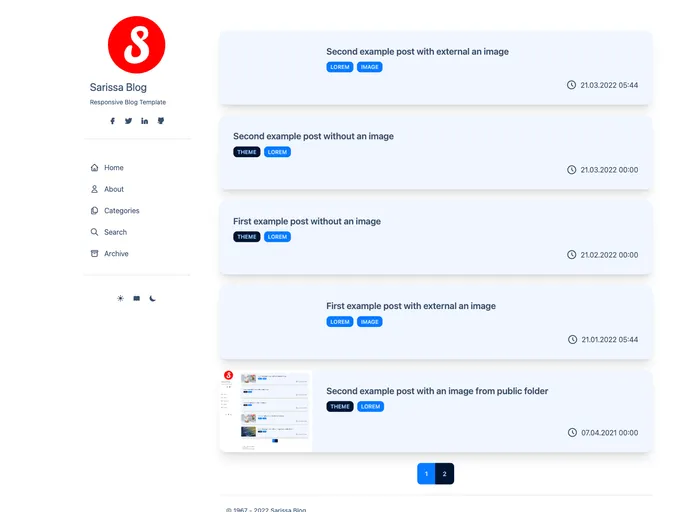
Overview
The Astro Sarissa Blog Theme is a responsive and functional theme designed for personal blogs using the Astro framework. It offers various features to enhance markdown-based blog needs and comes with three color modes. The theme is easy to configure and includes built-in search functionality, pagination, and support for draft pages.
Features
- Responsive and functional: The theme is designed to adapt to different screen sizes and devices, ensuring a smooth user experience.
- Markdown-based blog: It supports markdown syntax for creating blog posts, making it easy to format and write content.
- Three Color Mode: Users can choose from three color modes - Light, Book, and Dark - to personalize the appearance of their blog.
- Easy site configuration: The theme provides easy configuration options to customize the site settings.
- Built-in article title and description search: Users can search for specific blog posts based on their titles or descriptions.
- Support for draft pages: The theme offers support for draft pages, allowing users to work on unpublished content without it being visible to the public.
- Pagination for archive and category view: It includes pagination functionality for browsing archived posts or posts belonging to specific categories.
- Used libraries: The theme utilizes various libraries such as Tailwind CSS framework, DaisyUI component library, Fuse.js for fuzzy search, and Luxon for date and time management.
Installation
To install the Astro Sarissa Blog Theme, follow these steps:
- Ensure you have Astro installed and set up in your project.
- Copy the theme files to your project’s theme directory.
- Open the
astro.config.mjsfile in your project. - Add the following code snippet to import the Sarissa Blog theme:
import sarissaBlog from 'path/to/sarissaBlog';
- Add the theme to your Astro config’s
themesarray:
export default {
  // other configuration options
  themes: [sarissaBlog],
}
- Configure the theme settings in the
astro.config.mjsfile or create atheme.config.mjsfile with your custom configurations. - Customize the theme as per your requirements by modifying the theme files.
Summary
The Astro Sarissa Blog Theme is a responsive and functional theme that caters specifically to personal blogs utilizing the Astro framework. With its markdown-based blog feature, easy site configuration, and built-in search and pagination functionalities, it provides a convenient solution for bloggers looking to create an appealing and user-friendly blog. The theme is backed by popular libraries such as Tailwind CSS, DaisyUI, Fuse.js, and Luxon, ensuring a robust and modern development experience.











































