



 Github Stars:
 Last Commit:
  Created:


Overview
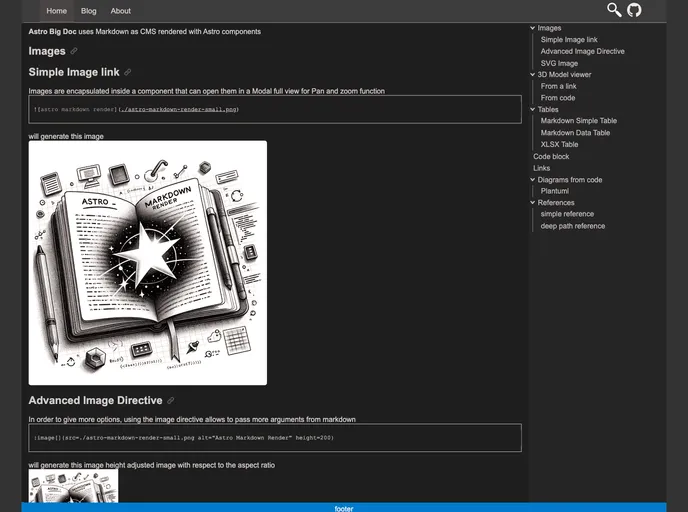
The Astro Big Doc theme is designed for big documentation websites, offering scalability and user-friendly features. It includes an unlimited depth config menu with a top appbar for sections navigation and a tree left menu for pages. Each page has a tree right menu for its table of content. The theme is performance-oriented, using only Astro components and focusing on static generation on build time rather than client-side rendering. JavaScript is used for minimal manipulations connecting events and classes.
Features
- Unlimited Depth Config Menu: Allows for easy navigation through sections and pages.
- Collapsible and Adjustable Menus: Both the left and right menus can be collapsed and their width can be adjusted by the user.
- Performance-Oriented: Uses only Astro components and no external CSS framework.
- Static Generation: Focuses on static generation on build time rather than client-side rendering.
- User-Friendly Markdown: Supports Markdown without the need for importing and referencing local images.
- Enhancements with Components: Includes components for panzoom, gallery, and code embeds.
Installation
To install the Astro Big Doc theme, follow these steps:
- Clone the repository:
git clone https://github.com/microwebstacks/astro-big-doc.git - Change directory to the cloned repository:
cd astro-big-doc - Install dependencies:
npm install - Build the project:
npm run build - Start the server:
npm start - Access the documentation website in your browser at
http://localhost:3000
Summary
The Astro Big Doc theme is a versatile theme designed for big documentation websites. It offers an unlimited depth config menu, collapsible and adjustable menus, and a focus on performance and static generation. With user-friendly Markdown support and additional components for enhanced functionality, it provides a comprehensive solution for documentation websites.










































