



 Github Stars:
 Last Commit:
  Created:


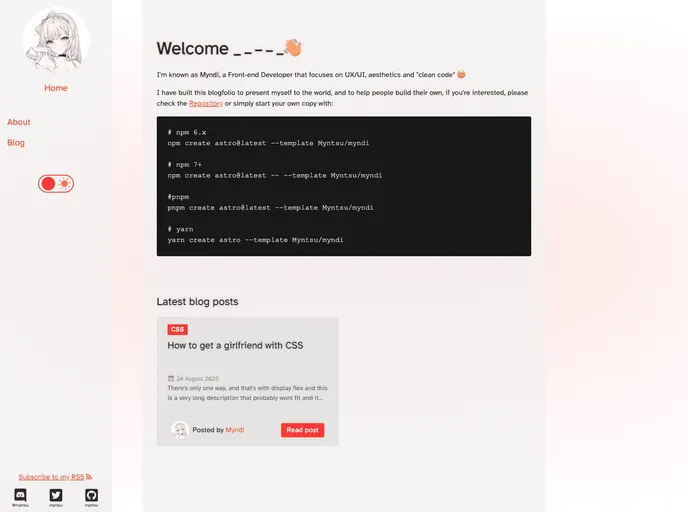
Overview:
The Astro Portfolio & Blog is a website that is currently under development. It offers a vanguardist layout with simple colors and an intuitive design. The website is responsive and mobile-friendly, with an accessible and hyperlegible font. It supports type-safe Markdown and has a super-fast loading time. It also includes features such as draft posts, pagination, related posts, categories, author information, a sitemap, and an RSS feed. The website follows mostly best practices and is customizable. However, it lacks features such as fuzzy search and may be considered dull for some users.
Features:
- Vanguardist layout
- Simple colors, intuitive design
- Responsive
- Mobile Friendly
- Accessible, hyperlegible font
- Type-safe Markdown
- Super fast loading
- Draft posts, pagination, related posts, categories, author
- Sitemap & RSS
- Mostly best practices
- Customizable
- Fuzzy search (missing)
- Boring portfolio/blog design (missing)
Installation:
To set up the Astro Portfolio & Blog theme, there are three options available:
- Template (coming soon): Once available, you can use a template to quickly set up the website.
- Clone/fork the repository: You can clone or fork the repository of the theme.
- Do it yourself: If you prefer, you can start a new empty Astro project and follow the steps below to integrate the necessary dependencies.
Dependencies:
The Astro Portfolio & Blog theme requires the following dependencies:
- SaSS and SCSS
- Astro ImageSharp
- Astro Sitemap
- Astro Icon
- Astro RSS
SaSS and SCSS quick setup:
To quickly set up SaSS and SCSS, follow these steps:
- Install SaSS.
- Usage instructions for SaSS and SCSS.
Astro Image & Sharp quick setup:
To quickly set up Astro Image & Sharp, follow these steps:
- Install Astro ImageSharp.
- Update astro.config.* to add the necessary configurations.
- Add the required code in astro.config.* and <head>.
- Add the necessary code in robots.txt.
Astro Sitemap quick setup:
To quickly set up Astro Sitemap, follow these steps:
- Install Astro Sitemap.
- Add the required code in astro.config.*.
- Update astro.config.* to include the necessary configurations.
- Add the necessary code in <head>.
- Add the necessary code in robots.txt.
Astro Icon quick setup:
To quickly set up Astro Icon, follow these steps:
- Install Astro Icon.
- Usage instructions for Astro Icon.
Astro RSS quick setup:
To quickly set up Astro RSS, follow these steps:
- Install Astro RSS.
- Create a file named rss.xml.js at the root of /pages.
- Add the required code in rss.xml.js.
- Create a styles.xsl file at /public/rss.
Summary:
The Astro Portfolio & Blog is a website theme that offers a vanguardist layout with simple colors and an intuitive design. It is responsive, mobile-friendly, and uses an accessible and hyperlegible font. The theme supports type-safe Markdown and has a super-fast loading time. It includes features such as draft posts, pagination, related posts, categories, author information, a sitemap, and an RSS feed. Users can customize the theme to suit their preferences. However, it lacks features like fuzzy search and may not be visually appealing for everyone.











































